Juniper Booking Engine logo
box

Vacation Packages

Configure your Vacation Packages combining own and external products

Juniper Vacation Packages, the ideal technology to customise travel

Juniper Vacation Packages is the module of the Juniper Booking Engine that is designed to offer you the freedom to build your own holiday packages according to the unique needs of your customers.

What does it offer?

Packages_img

In Juniper, we offer two Package modules that you may configure according to your needs:

PaqueteDinamico_graphic_EN

How does Dynamic Packages work?

With Dynamic Packages you will enjoy the flexibility to combine your own products and external ones.

This capability allows you to create unique and customised offers that can adapt to the specific needs of each customer, enhancing their overall experience.

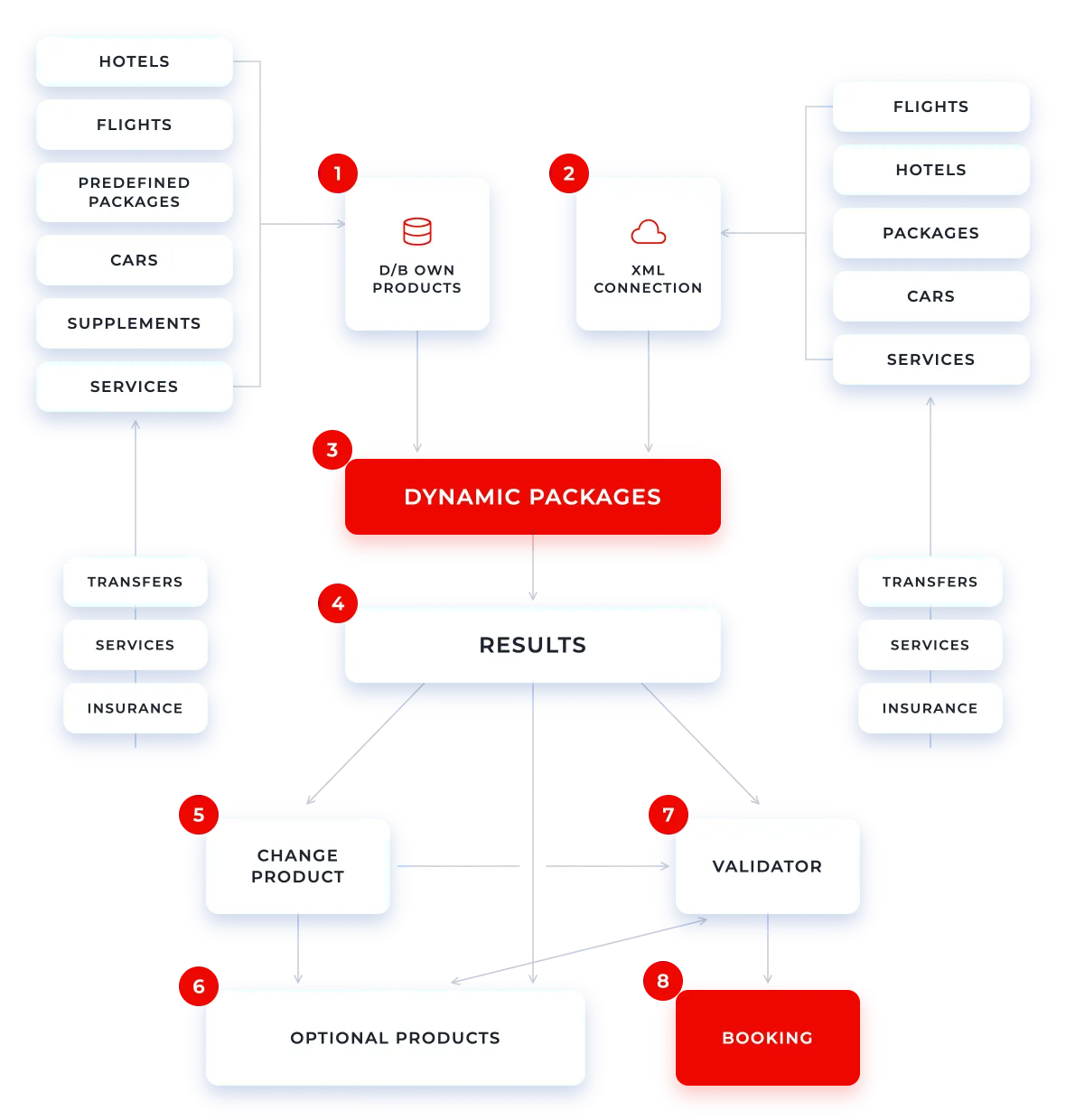
Dynamic Packages Workflow

1

You may upload own product Hotel, Flights, Predefined Packages, Car Hire, Supplements and Services (Transfers, services and insurance) in the booking engine and generate an own product database.

2

Apart from own product, you may have xml connections of external products that provide Hotels, Flights, Packages, Car Hire and Services (Transfers, services and insurance).

3

We have a Dynamic Package Library.

4

You may obtain the search results.

5

Once you obtain the dynamic packages results, you may change any product that is part of the package.

6

You may search, select and delete optional products such as Transfers, services, insurance, Car Hire and Supplements.

7

We have a validator of prices and consistency of the package that will validate the dates, prices, stays and package allotment.

8

In the last step, you may confirm the package booking and assign allotment.

DynamicPackages_graphic_EN

Trip Step by Step

Offer a more intuitive, step-by-step guided web navigation experience, tailored to the needs of your customers.

With this add-on for the Dynamic Packages module, you will significantly improve the user experience (UX) and facilitate the booking process for customers seeking holiday packages:

The navigation will be adaptable for an efficient booking process

Optimise the booking process with various navigation flows that adapt to customer preferences, avoiding unnecessary steps while ensuring that all mandatory actions are completed.

An optimised booking flow will help to eliminate errors

Simplify each step in the booking process, reduce errors, and minimise unnecessary actions while also showing the progress of the booking, guaranteeing a fluid and consistent experience across any device.

Provide complete information for quick decision-making

Offering all relevant details about products and the final price from the very first step, empowering your customers to make informed choices swiftly.

Maintain total flexibility at every step of the booking process

Allowing customers to change selected options, add new services, and access all the information they need at each stage of their journey.

Predefinedpackages_img

How does Predefined Packages work?

The Predefined Packages allow you to upload in your system your own vacation predefined packages with a specific duration, departure dates, different hotels, allotment and room types with closed prices to which you may add an optional supplement or taxes.

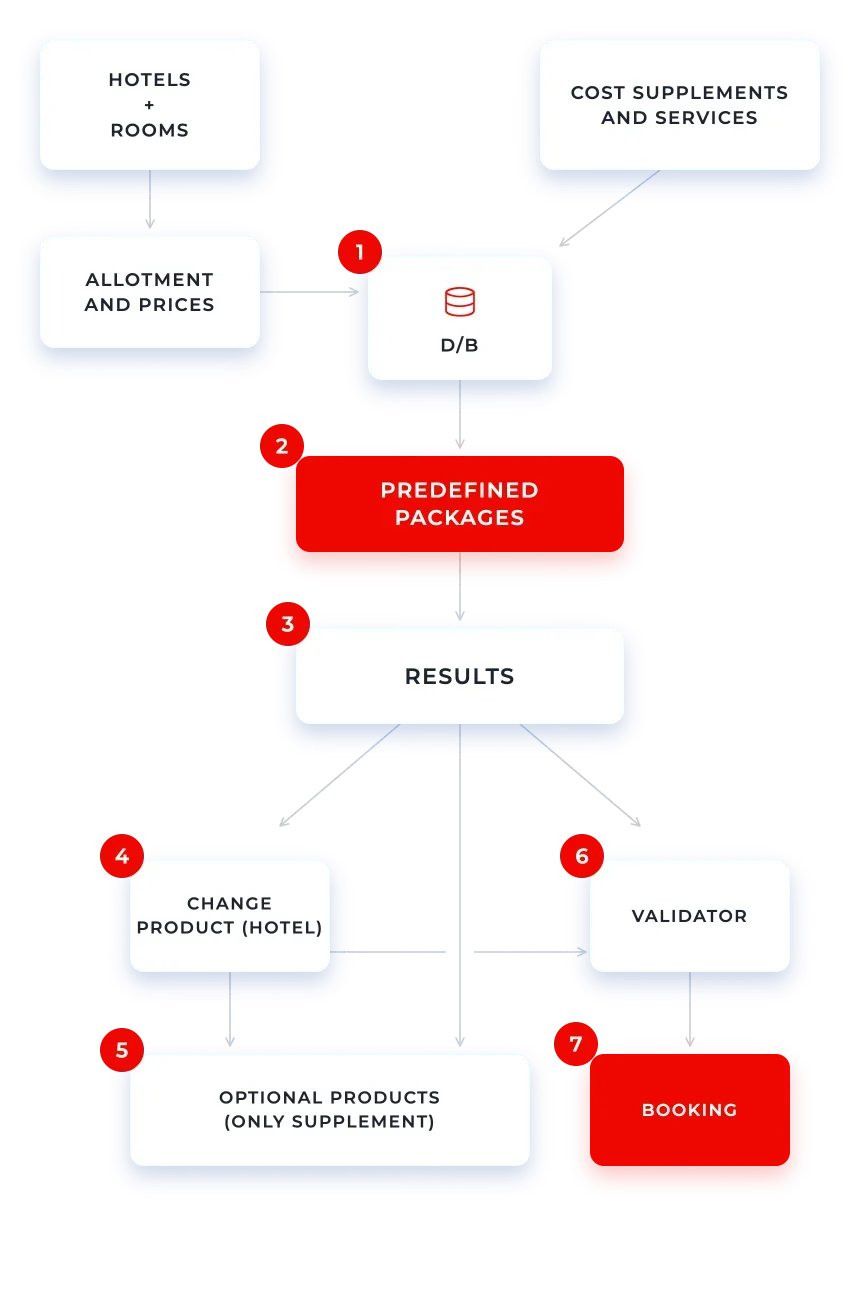
Predefined Packages Workflow

With this module, you may assign a closed fixed Price (Sales and/or total cost per PAX) for the complete package.

1

You may upload own product Hotel, Flights, Predefined Packages, Car Hire, Supplements and Services (Transfers, services and insurance) in the booking engine and generate an own product database.

2

We have a Predefined Package Library available.

3

You obtain the results of the search.

4

Once you obtain the predefined packages results, you will be able to change the product (only Hotel), if the hotel we obtained, by default is not the preferred one.

5

You may search, select and delete optional products, if any.

6

We have a Price validator for the consistency of the package that will validate the dates, prices, stays and package allotment.

7

In the last step, you will confirm the package booking and the allotment assignment.

You can also edit:

Master Package

Packages with flexible destination and duration (they always have to have at least a hotel or a flight).

Multiple destination Package

Packages with more than one destination.

City Packs

Packages with services and required transfers, optional, etc…

Optional Products

Add products to your packages, such as car hire, services, transfers, predefined packages, and more.

PredefinedPackages_graphic_EN

Enable your customers to prepare any kind of holiday package

Find out more about multichannel distribution

Download the free PDF

Try the demo
for Cruises lines

[formulario_pardot_demo_cruises_home_EN]

Try the demo
for Airlines

[formulario_pardot_demo_airlines_home_EN]

Try our demo
for Bed Banks

[formulario_pardot_demo_bed_banks_home_EN]

Try the demo
for OTAs

[formulario_pardot_demo_ota_home_EN]

Try the demo
for DMCs

[formulario_pardot_demo_dmc_home_EN]

Try the free demo
for Tour Operators

[formulario_pardot_demo_ttoo_home_EN]

Try the demo

[formulario_pardot_demo_home_EN]