Home chevron_right Products chevron_right Juniper Booking Engine chevron_right Modules chevron_right Multicurrency
JUNIPER BOOKING ENGINE

1
The Seller works with € so the base currency of the channel is €.
2
If you have an exchange rate protection integration, there is an exchange protection in the exchange rate to the “Dollar channel” otherwise, the conversion will apply without such protection.
3
The availability is offered in the channel’s currency.
4
The booking is made in the channel’s currency.
5
The payment is made in the channel currency as credit, bank transfer or via payment gateway.
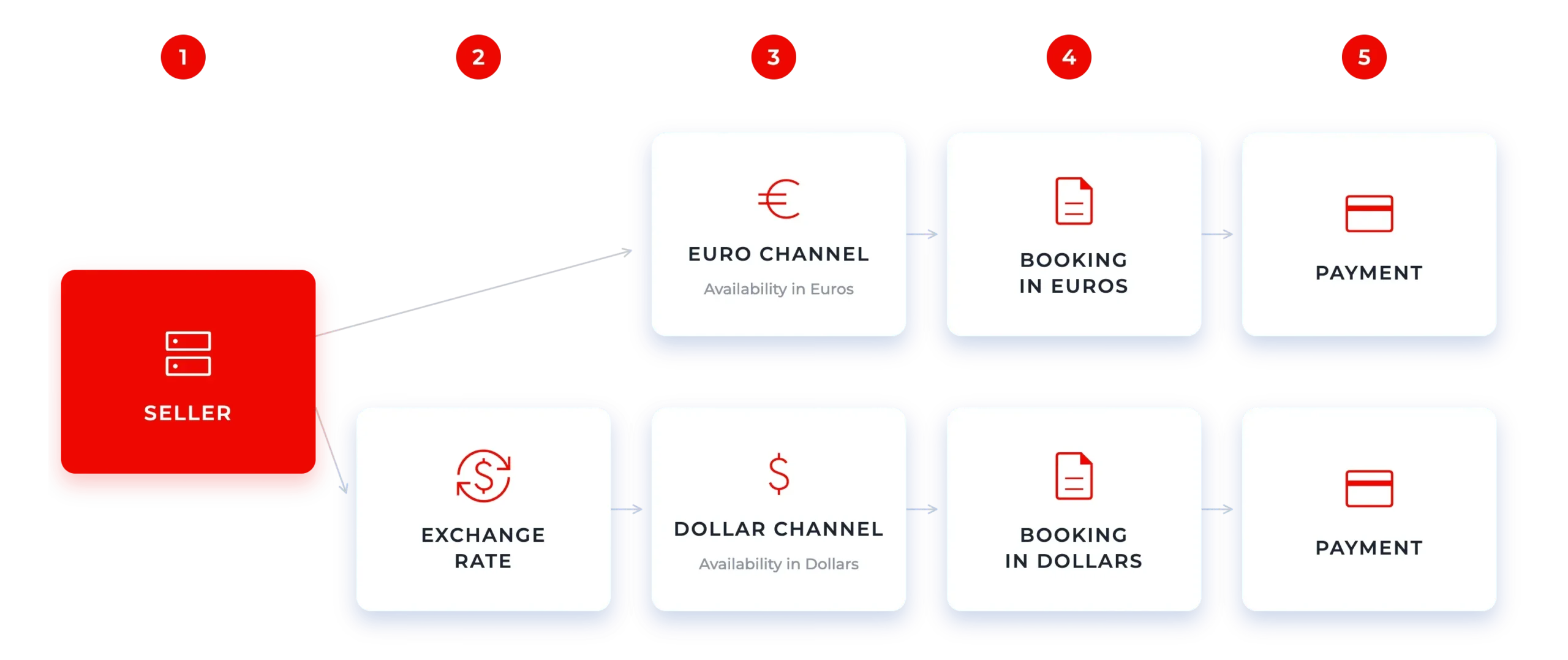
This setting is used to return the sales price in the seller currency, this is usually the way, where sales are being made through Webservice sales channels.
Within the same sales channel you may see each result (Availability) in the base currency of the seller (their local currency). Therefore, in the same results you may find the same Hotel with prices in different currencies and the customer will end up paying in the currency they have previously selected for that specific offer.
Following the graph:
1
Here is the flow with a multicurrency channel.
2
In this case the system forces Seller currency.
3
Each seller operates with its own base currency (local currency).
4
The results are delivered in the different seller currencies (you may have the same hotel with prices in different currencies, from the different sellers you have).
5
The customer chooses among the offered results and the booking is made in the seller currency, thus, without applying an exchange rate.
6
The payment is made in the seller currency as credit, bank transfer or via payment gateway, as you allow.
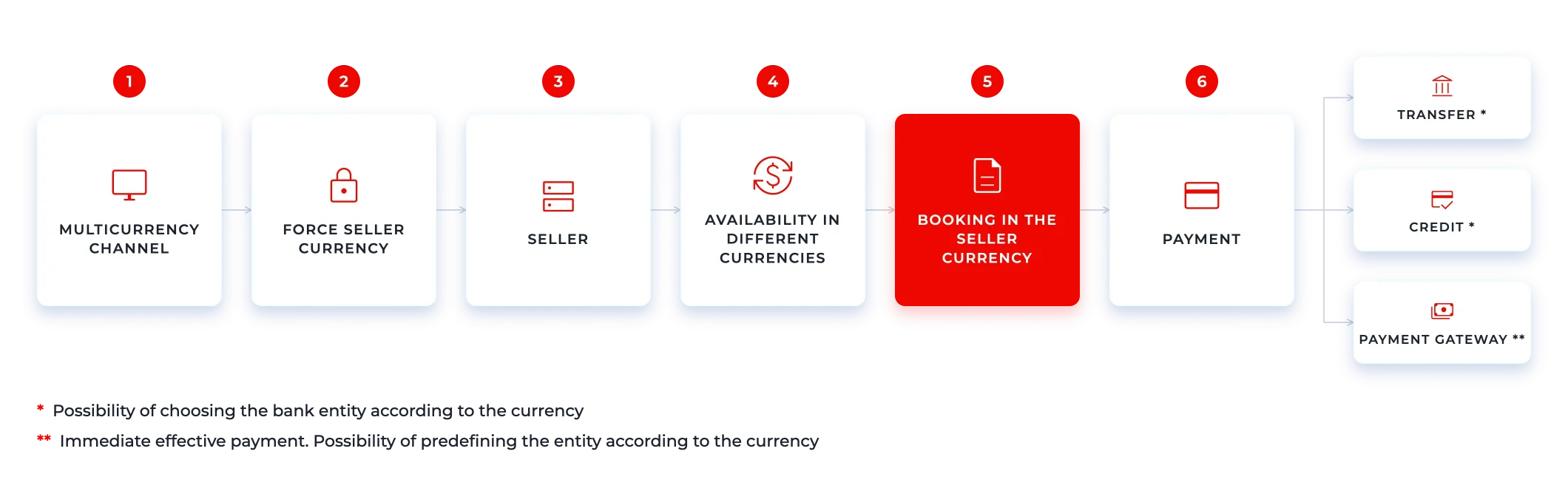
This setting is used to force the sales currency as selected by the customer, independently of the currency returned by the seller.
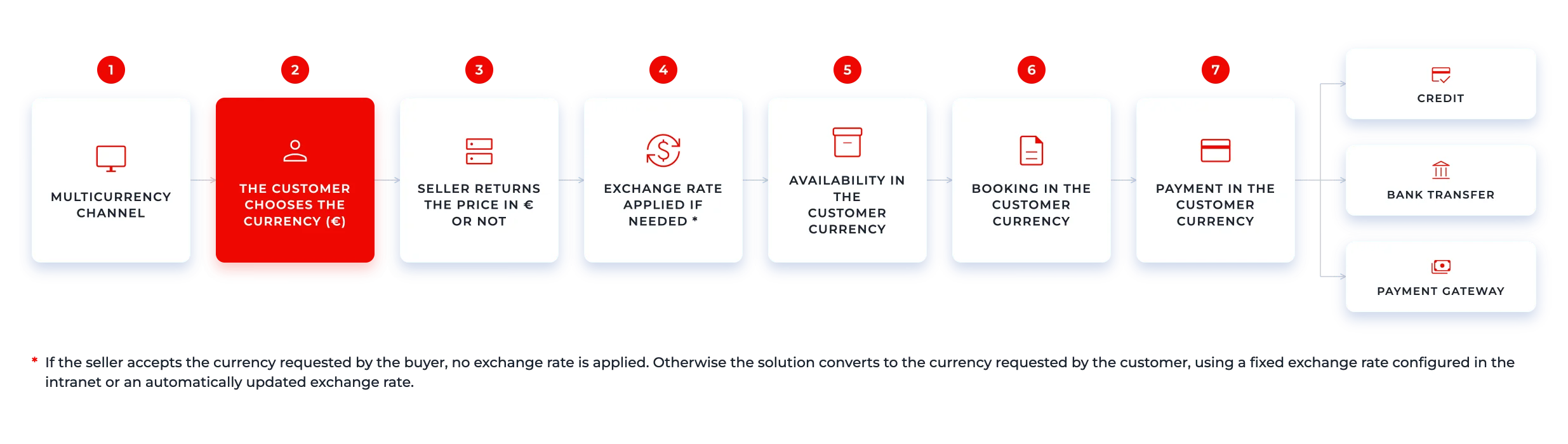
In this case, the End customer is who chooses the preferred currency.
Following the graph:
1
Here is the flow with a multicurrency channel.
2
The end customer chooses the currency (in this example: €).
3
The seller may return the price in € (accepting the request of the currency) or not.
4
If the seller accepts the currency requested by the buyer an exchange rate will not be required to be applied.
Otherwise, the solution will apply a currency exchange rate to the currency expected by the seller, to be able to show the currency requested by the customer. This exchange rate can be applied according to:
5
The availability will be shown in the currency selected by the Customer.
6
The booking is made in the currency selected by the Customer.
7
The payment is made in the currency chosen by the Customer, as credit, bank transfer or via payment gateway.

It is a system that allows the Juniper client to manage the volatility of the currencies with which it operates to protect its profit margin. It is particularly useful if one is not operating with the most internationally used and stable currencies. Therefore, it acts as an additional feature of the Multicurrency module (it is a service provided by an external supplier).
In Juniper we have currency protection, which you may review and check in our connections.

🍪 This website uses cookies for a better experience.
This website uses cookies for a better experience.